How to Redeem Gakusen Codes
Exact Settings path, case-sensitive tips, and fixes when REDEEM fails in the Roblox beta.
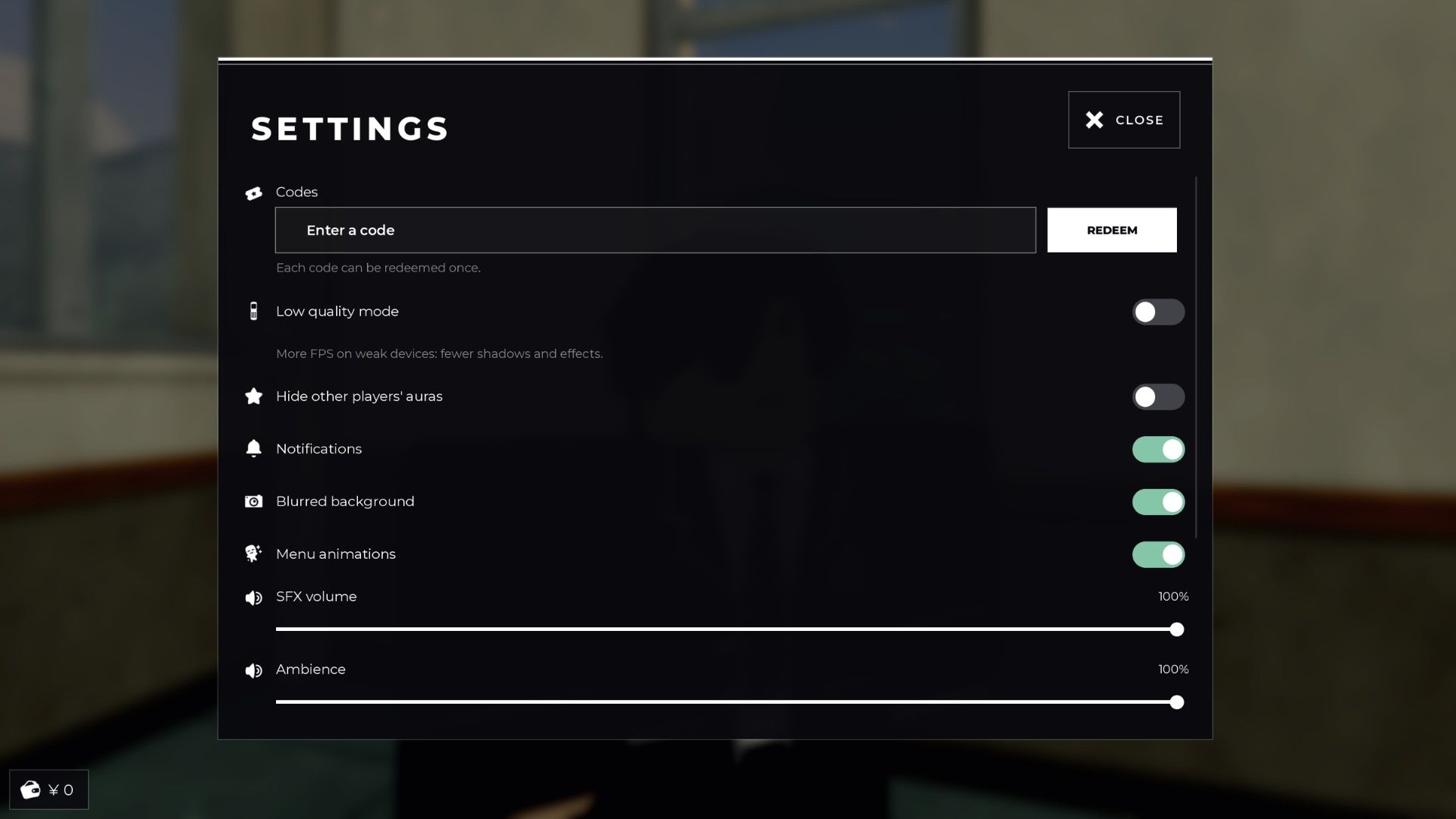
Redeeming codes is the fastest free start in Gakusen, the Roblox beta set in a spring Japanese countryside school town. Promo strings grant Rerolls so you can change look and style for chill roleplay around the konbini and train, or for louder energy on the school roof. This page is the deep walkthrough: exact UI path, verified strings as of 22 November 2026, troubleshooting when nothing happens, and what to do with Rerolls after they land.
If you only need the live table, keep the Codes Hub bookmarked. Come here when the button will not cooperate, you are on mobile, or a friend sent a screenshot that does not match your client.
Before you redeem (sanity checks)
- Confirm you are in the real experience: Gakusen on Roblox (place
134236830050671, universe10768781474). - Confirm the creator group is Gakusen (community
198308706) via the Links Hub if the page looks off. - Join a normal server (up to 50 players). Soft-locked or empty broken shards sometimes hide UI.
- Do not type your Roblox password into any website that claims to “auto redeem” codes. Redemption only happens inside Gakusen.
Gakusen is inspired by the wider school-uniform battlegrounds mood associated with names like Gakuran, but this game is Gakusen. Wrong place id means wrong codes UI.
Step-by-step: redeem in Settings
- Press Play and wait until your avatar finishes loading in the spring town.
- Look at the top-left of the screen and open Settings.
- Find the field labeled roughly Enter a code (beta wording can shift slightly after a patch).
- Click or tap the field so the keyboard / text focus is active.
- Type or paste a code exactly, respecting uppercase letters.
- Press REDEEM once and wait a beat for the reward toast or inventory change.
- Close Settings fully before you move — overlapping menus are a common beta annoyance.
- Repeat for the next unused code. Do not mash REDEEM on a code you already claimed.
Verified and reported codes (22 November 2026)
| Code | Reward | Notes |
|---|---|---|
UPDATE | 30 Rerolls | Primary / verified |
DISCORD | 15 Rerolls | Primary / verified |
UPDATE2 | 15 Rerolls (reported) | Try once; not always listed as primary |
Treat UPDATE and DISCORD as the reliable pair. UPDATE2 is a community-reported extra — enter it once; if the game rejects it, you still have the verified rewards.
Mobile, desktop, and controller notes
- Desktop: easiest typing path; watch for sticky focus if chat is also open.
- Mobile: open Settings before rotating the device; paste from a notes app if the on-screen keyboard fights you.
- Controller: highlight the text field carefully; if focus jumps, switch to touch/keyboard for the redeem step, then return to stick controls.
Mixed devices share the same 50-player servers, so a friend on phone can redeem the same strings you use on PC.
Troubleshooting when REDEEM fails
Work down this list before assuming the code is dead:
- Case and spelling —
updateis notUPDATE. Extra spaces before or after the string also fail. - Already claimed — most promos are once per account. A silent fail often means you redeemed earlier on this Roblox user.
- Wrong experience — leave and relaunch from the official place link above.
- Stale server — hop to a fresh server after a patch; old instances can lag UI updates.
- UI buried — close emote panels, shop teasers, or chat overlays that cover the code field.
- Beta label rename — if “Enter a code” moved, skim Discord (
https://discord.com/invite/erKvKfJyv4) and the Updates Hub for UI notes instead of trusting a week-old screenshot. - Expired string — when a code truly dies, the Codes Hub and Discord posts will shift; do not buy “private code lists” from strangers.
Still stuck? Rejoin once, redeem only the two verified codes, then ask in Discord with a screenshot of the Settings panel (never your password).
What happens after a successful claim
Rerolls bank on your account for customization. They do not replace yen you earn from town activities like fishing, tofu jobs, or other loops described in Earn Yen. Use free rolls for experiments; save currency for looks you already love.
Suggested order after redeeming:
- Finish the day-one route in Getting Started so you see school, konbini, train, and roof lighting before you spam rolls.
- Open the Players Hub and decide whether this session is RP, mixed, or roof main.
- Spend slowly — change one axis at a time when the UI allows, and screenshot favorites.
- Recheck Discord after content drops; solo-dev betas often ship a new string with a patch.
Safety rules (read these once)
- Redeem only in Gakusen Settings.
- Ignore browser extensions and “Roblox code bots” that ask for cookies or passwords.
- Do not download executors because someone promised auto-redeem macros — that path overlaps the ban-risk territory covered on the Scripts Hub.
- Prefer the invite on Links over mystery short URLs in random Discord DMs.
Related pages
- Codes Hub — live list and status table
- Getting Started — day-one town loop after you claim
- Players Hub — spend Rerolls with a plan
- Links Hub — Discord, group, and Roblox place
- Updates Hub — why UI labels can move in beta
Redeem early, redeem carefully, and treat every new screenshot as unverified until Settings accepts the string. Free Rerolls are only free if you do not trade your account for a fake generator along the way.
Frequently Asked Questions
Quick answers about codes, rerolls, and school-town play in Gakusen.
Where do I redeem Gakusen codes?
Open Settings from the top-left of the screen, enter the code in the Enter a code field, then press REDEEM. Redemption only works inside the game.
What codes work right now?
As of 22 November 2026, UPDATE (30 Rerolls) and DISCORD (15 Rerolls) are the primary verified pair. UPDATE2 (15 Rerolls) is widely reported — try it once.
Why did my code fail?
Check case-sensitive spelling, confirm you are in place 134236830050671, rejoin a fresh server, and remember most codes can only be claimed once per account.
Can I redeem codes on a website?
No. External generators are scams. Never enter your Roblox password on a “redeem for me” site.
What should I do after redeeming?
Explore the town via Getting Started, then plan looks on the Players Hub before spending every Reroll.