Controls & UI in Gakusen
Settings, movement, and school-brawl habits for a live Roblox beta.
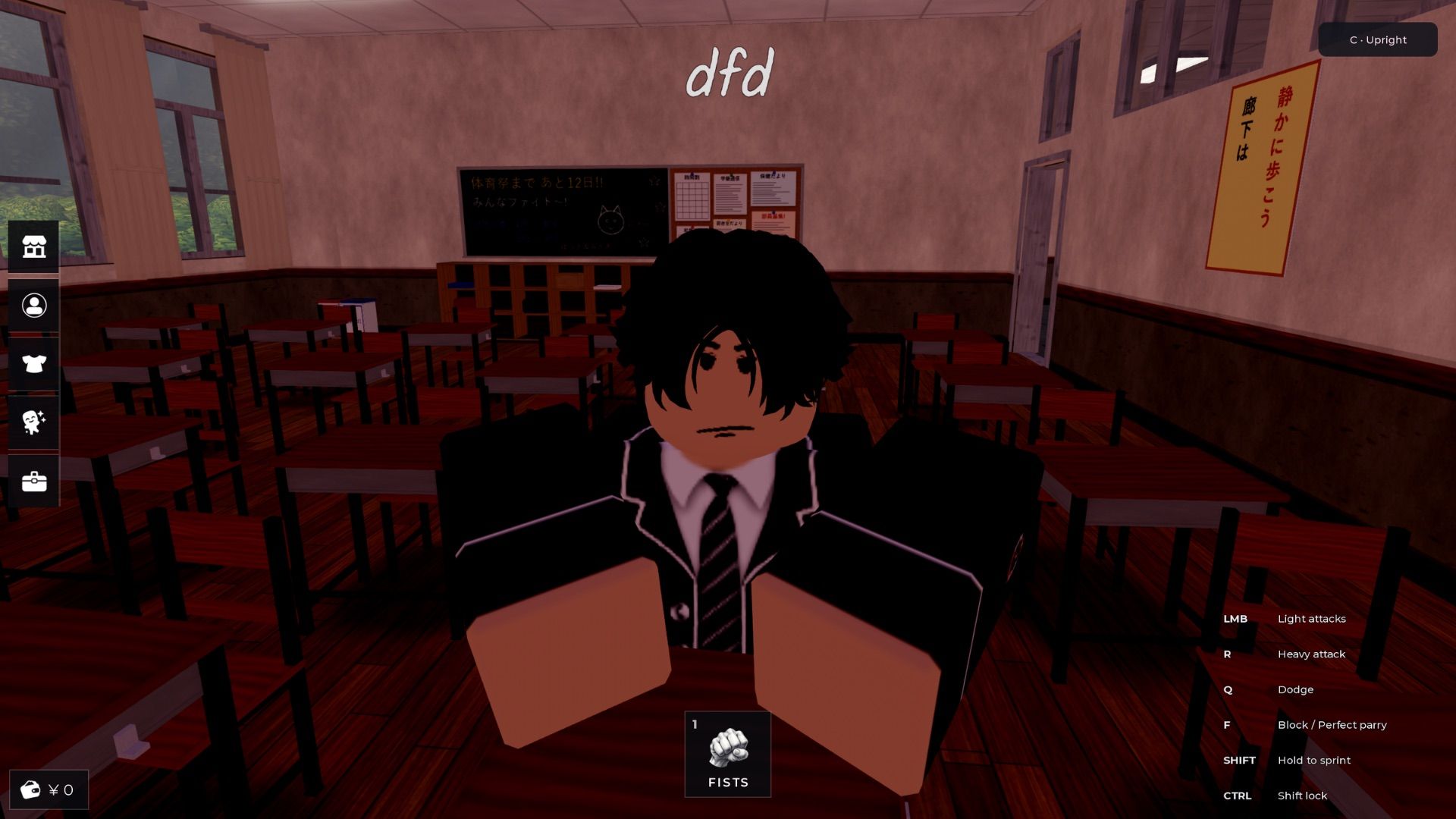
Gakusen plays like a Roblox school-town battlegrounds hybrid: you need comfortable camera + movement for streets and halls, plus fight habits that work when the lobby climbs onto the roof. Because the game is a beta from a solo developer, exact key labels can shift after a patch. This guide documents what players commonly need — treat in-game prompts as the final authority, then re-check the Updates Hub when something moves.
If you have not redeemed codes yet, pause and open the Codes Hub first. Rerolls will not help if you cannot open Settings.
The one UI path every player must know: Settings
- Look to the top-left of the screen for Settings.
- Inside, find the Enter a code field used for promo redemption.
- After typing a case-sensitive code, press REDEEM.
- Close the menu fully before you move — overlapping UI is a common beta annoyance.
Settings is also where quality, volume, and other Roblox-adjacent options may live depending on the current build. If the button is missing on a broken shard, rejoin once before assuming a wipe.
Movement fundamentals (town + campus)
Gakusen’s map is compact: school, classrooms, konbini, train overlook, roof. Smooth movement matters more than fancy tech.
Practical habits that transfer across Roblox fighters:
- Keep camera height comfortable so you can see stair entrances early.
- Strafe while exploring crowds; standing still in doorways blocks RP and lookouts.
- Learn the route from street → school → roof without sprinting blind off ledges.
- When lag spikes hit (50-player servers), stop challenging mid-teleport.
Use Locations & Map to pair these habits with landmarks. New accounts should finish Getting Started before optimizing movement tech.
Camera tips for spring lighting and rooftops
Spring countryside lighting looks great in screenshots and harsh in fights. On the roof:
- Pull the camera out far enough to see multiple opponents.
- Avoid extreme low angles near edges — depth perception gets messy.
- Re-center after emotes or RP scenes before you accept a duel.
- If a cosmetic is hard to track, consider a cleaner look from the Players Hub / Tier List.
Fighting stance assumptions for school brawls
Gakusen sits in Action / Battlegrounds & Fighting territory even when half the server is roleplaying. Until a patch publishes a full move list in-UI, use these assumptions that experienced Roblox brawler players rely on:
- Basic attack string — a primary click/tap chain for pressure.
- Block / guard — hold or toggle to reduce chip when you guess right.
- Dodge / sidestep window — short mobility to escape telegraphs.
- Sprint + space control — create reset distance on a finite roof.
- Lock attention — even without hard lock-on, pick one target in piles.
Exact bind names may differ in your build. Open any in-game help prompts after updates. For etiquette and when not to swing, read Rooftop PvP.
Warm-up routine (three minutes)
- Walk school stairs twice without falling.
- Practice camera orbit while strafing on flat roof ground.
- Throw a few empty attack strings into air / dummy space if available.
- Block facing a friend for timing feedback.
- Only then join a live 1v1.
Skipping warm-ups is how you feed the first highlight reel of the lobby.
Mobile vs desktop expectations
Roblox brings mixed input devices into the same 50-player server.
- Desktop: more precise camera flicks; still respect ping.
- Mobile: larger camera pull-out helps; avoid ultra-busy cosmetics you cannot track with a thumb.
- Controller: confirm sprint and block binds in Settings before ranked-feeling duels.
If a friend insists you are “bad,” compare devices before comparing ego.
UI clutter and performance habits
Beta UIs sometimes stack notifications, emote panels, or shop teasers. Before a serious roof set:
- Close code menus and accidental shop popups.
- Lower graphics if roof fights stutter hard.
- Mute chaotic voice/chat overlays if they distract (per your client options).
- Keep Discord on a second screen for code drops, not as an overlay covering block timing.
What not to do (controls edition)
- Do not install executors to “fix” your inputs. Auto Block / Auto Dodge / Auto Attack tools on the Scripts Hub violate Roblox ToS and risk bans.
- Do not spam Settings mid-combo — you will eat a full string.
- Do not assume last week’s bind screenshot is eternal; this is a live beta.
- Do not fight while the code keyboard is still open.
Linking controls to progression
Controls skill multiplies everything else:
- Better movement → safer yen routes through crowded streets.
- Better camera → clearer reads on aggressive looks from the tier list.
- Better block discipline → fewer rage quits after roof sets.
- Better Settings fluency → zero missed codes.
Related pages
- Getting Started — day-one context
- Rooftop PvP — apply inputs in real fights
- Locations & Map — where you will actually move
- Codes Hub — Settings redeem flow
- Scripts Hub — why automation is a bad “controls upgrade”
Master the boring stuff: Settings, camera, strafing, block guesses. Flashy drip from Rerolls feels better when you can actually steer it across a spring rooftop without walking off the ledge.
Frequently Asked Questions
Quick answers about codes, rerolls, and school-town play in Gakusen.
Where is Settings in Gakusen?
Top-left of the screen. Use it to redeem codes and adjust client options available in the current beta build.
Are the keybinds fixed forever?
Not guaranteed. Gakusen is a solo-dev beta — always confirm prompts in-game after patches.
What fight skills matter most?
Camera control, movement on finite roofs, block timing, and picking one target in multi-player piles.
Should I use scripts to auto block or dodge?
No. Those tools violate Roblox Terms of Use and can get accounts banned. Practice fair timing instead.
What should I practice before rooftop PvP?
Stair routes, camera orbit while strafing, empty attack strings, and a short block warm-up with a friend.